The 10 best project management software tools in 2026
Ten tools judged from the point of view of a team that ships technical work — six criteria published up front and a stated limitation for every one, ours included.
Most IT teams did not choose the project tool they use. It arrived. Sales already had a Trello board, leadership bought a work platform for the whole company, and the technical team was fitted into a workflow designed to approve campaign artwork. It holds up until the first sprint where nobody can say what actually went out on Tuesday.
The symptom is always the same: the work lives in two places. A user request starts as a ticket and gets retyped into a card. The card does not know which laptop broke, which credential the service uses, or which pull request closed the story. When the project ends, the evidence of what was done is spread across three tools and two people's memory.
Not every tool here is trying to fix that. Some were built for engineering and are excellent at it. Others are general-purpose work platforms — good for operations teams and uncomfortable for technical work — and the problem is not quality, it is audience. Selling a flat board as software project management is what costs a team a quarter.
Each tool below comes with a line naming the team it was actually built for, what it delivers without a plugin, how it bills, and where it stops.
What project management software actually is
Project management software is where a team declares what it will deliver, breaks that into units of work with an owner and a date, and can prove afterwards what actually shipped. The buying decision is almost never about that, though. It is about which of the four families in the category you need.
They look alike on screen — all of them have a board, a card and a status — and they solve different problems.
- Issue tracker
- Built for engineering. The unit is the issue, with hierarchy, time-boxed cycles, velocity and native branch and pull-request links. Jira, Linear, Shortcut and Azure DevOps belong here.
- Work management
- Generic by design: it serves any team, from HR to marketing, and therefore assumes nothing about yours. Asana, Monday, ClickUp, Notion and Trello live here.
- PMO and portfolio
- Thinks in schedules: Gantt charts with dependencies, critical path, resource allocation and budget per project. Smartsheet and Wrike are the common picks.
- Service management
- Built around the request that arrives from a user — incident, change, service catalogue — rather than a delivery with a start and an end.
| Issue tracker | Work mgmt | PMO | Service mgmt | Movitera | |
|---|---|---|---|---|---|
| Issue tied to a delivery | Covers | Partly covers | Partly covers | Does not cover | Covers |
| Cycle with a burndown | Covers | Partly covers | Does not cover | Does not cover | Covers |
| Initiative roadmap | Covers | Partly covers | Covers | Does not cover | Covers |
| Request from a user | Does not cover | Partly covers | Does not cover | Covers | Covers |
| Asset and credential context | Does not cover | Does not cover | Does not cover | Partly covers | Covers |
| Branch and pull-request link | Covers | Partly covers | Does not cover | Does not cover | Covers |
An in-house IT team usually needs a real issue tracker, a little portfolio view to explain priority upstairs, and a front door for the request that arrives from a user. Buying generic work management because the company already had a licence is the most common mistake in the category, and the hardest to undo — by the time it shows, two years of history live inside it.
The six criteria
Defined before the list, applied to every tool the same way.
- 01
Hierarchy technical work requires
Whether large delivery and issue exist as concepts in the product, with the day's work tied to the delivery it serves — or whether you simulate that with labels and cards inside cards.
- 02
From request to delivery without retyping
What happens when work starts as a user request. If the ticket and the issue live in different tools, somebody types it twice and traceability dies in the middle.
- 03
Cycles that close with evidence
Whether the product has a time-boxed window with a burndown and a closing analysis — completion rate, scope change — or whether a sprint is a label the team drags by hand every Monday.
- 04
Evidence of what shipped
Native branch and pull-request links, and some way to state at the end of a cycle what was delivered without someone compiling it by hand for the meeting.
- 05
A predictable bill
What the billing unit is — a user, a seat sold in blocks, a package with a minimum, an editor beside a free viewer — and whether AI sits inside the seat or is a credit pack bought separately.
- 06
Setup cost before the first shipped cycle
How much work sits between signing up and closing a cycle with owners and dates. A tool that needs a two-month implementation project costs more than its list price.
The 10 tools
Ordered by the criteria above, with each tool's intended buyer stated.
Movitera
Origin: BrazilBest for
An in-house IT team that both ships projects and answers users with the same people, and does it today with an issue tracker on one side and a help desk on the other.Movitera Projects is the delivery module: the issue as the unit of work, initiatives and domains above it, time-boxed cycles with a burndown, a board with blockers, and native branch and pull-request links through GitHub. The difference is not the feature list — it is the address. The ticket that became a project stays connected to the user's laptop, the service credential and the runbook from whoever fixed it last time, because all of those live in the same workspace.
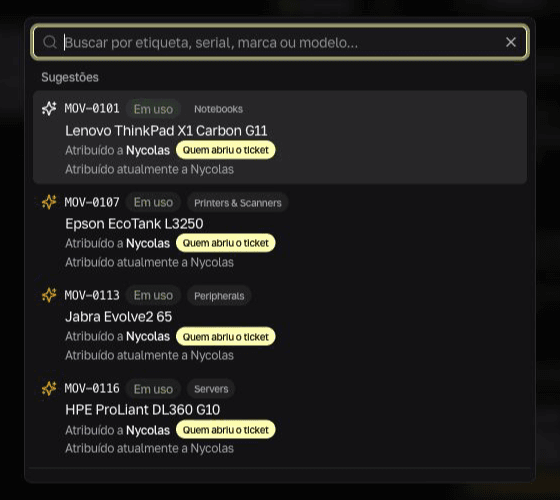
The user's request starts here, already tied to their equipment — and from here it becomes tracked work in Projects without anyone retyping it into another tool. What it delivers- Issue, initiative, domain and cycle as product concepts, with a board, blockers and estimates — not improvised labels
- Time-boxed cycles with a burndown, a closing analysis — completion rate, scope change, composition by type — and release notes generated from what closed
- User tickets, hardware inventory, credential vault, vendor contracts and a wiki in one workspace, with search that crosses all of them
- Native GitHub: branches and pull requests linked to the issue, and an issue can be handed to a coding agent
- AI included in the seat rather than sold as a credit pack
- Seat types are split, so people who only file requests do not consume a delivery seat
- Nothing to implement: sign up, and the board, the cycle and the first issue exist the same day
Where it stops- The hierarchy runs from initiative to issue and stops there: there is no sub-task, and the cycle page reports a burndown, completion rate and scope change rather than a calculated velocity. Teams that plan by story points and historical velocity will miss it.
- The roadmap timeline is at initiative level, not task level: there is no Gantt with dependencies between activities and no critical path. Formal predecessor scheduling belongs elsewhere.
- Code integration is GitHub only. Teams on GitLab or Bitbucket lose the automatic branch and pull-request link.
- Billing is in Brazilian reais only, which is fine if you buy in Brazil and awkward if your finance team needs a USD or EUR invoice.
- It is not a corporate portfolio tool: no capacity-based resource allocation, no budget per project, and no creative-asset approval flow.
How it bills Per-seat subscription billed in Brazilian reais, from R$ 9 to R$ 129 per month depending on access type. 7 days free, no card.
Explore MoviteraLinear
Origin: United StatesBest for
A product and engineering team that wants the fastest, most opinionated issue tracker on the market and does not need to serve end users in the same tool.Linear is what happens when someone decides software project management is a problem of interface speed. Cycles, triage, hierarchy and Git links are native and fast, and the product deliberately refuses almost everything that is not software delivery. For a pure engineering team it is the reference point.
What it delivers- Native cycles, triage and project hierarchy, with an interface that is the product's main argument
- Deep Git integration: branches and pull requests move issue status without third-party automation
- Keyboard-first design that survives daily use by a technical team
- Agent and assisted-triage features on the upper tiers
Where it stops- It takes requests in through forms, email and Slack, but it is not a help desk: there is no support queue with SLAs and no conversation history with the end user.
- No assets, credentials or contracts — the operational context of IT sits outside it.
- Deliberately narrow: no schedule, no portfolio, no budget. That focus is the product, and it means a second tool for anything outside delivery.
How it bills Per user per month, monthly or annual on the self-serve tiers, with a free tier capped by issue count and number of teams. Some agent features draw on a separate AI credit pool.
Jira
Origin: AustraliaBest for
An organisation with several engineering teams, formal process and somebody whose job includes administering the tool.Jira is the category standard and remains the right answer when the problem is scale and governance: workflows configurable to the last state, permission schemes per project, and a marketplace that covers almost any requirement. That power has a price, and it is not on the pricing page — it is in the time of whoever configures it.
What it delivers- Complete hierarchy, backlog, sprint and agile reporting, with cross-team planning on the upper tiers
- Workflow and permission schemes configurable in fine detail
- The largest app and integration ecosystem of any tool here
- A ready path to service management through the Jira Service Management family
Where it stops- Configuration is a project in itself: without someone who knows workflow and permission schemes, the team inherits an installation nobody understands.
- Performance and clarity degrade as issue volume and automation count grow.
- The real cost depends on how many marketplace apps your process needs, and that never shows in the per-seat price.
How it bills Per user per month, with a free tier capped by user count. The per-seat rate falls at volume thresholds, and effective cost depends on marketplace apps bought separately.
Azure DevOps
Origin: United StatesBest for
A team already standardised on Microsoft tooling that wants boards, repositories and pipelines under one login.Azure DevOps is the least fashionable serious option here and often the most pragmatic one. Boards sit next to repos, pipelines and test plans, which means the delivery evidence this page keeps asking about is built in rather than integrated. It also feels its age next to Linear, and that is a real cost for a team that lives in it all day.
What it delivers- Boards, repositories, pipelines and artifacts in one product, with delivery traceability by default
- Free for the first few users, which makes a small team's entry cost close to zero
- Fits an organisation already invested in Microsoft identity and licensing
- Backlog, sprint and query tooling deep enough for formal process
Where it stops- The interface is dated and slow to work in compared with the newer trackers on this list.
- Test plan capability sits behind a far more expensive licence rather than a modest add-on.
- Pipeline concurrency is metered separately once you pass the free allotment, so the bill is not just seats.
How it bills Per user per month with the first few users free; test plans require a much higher licence tier, and pipeline parallelism is billed separately from seats.
ClickUp
Origin: United StatesBest for
A team that wants one tool for everything and accepts paying for that in configuration time.ClickUp is the generic platform that comes closest to covering technical work: it has sprints, burndowns, its own hierarchy and two-way integration with the major code hosts. It is also the one that asks the most of a team before giving anything back — the surface is enormous, and nearly everything is configurable, which means nearly everything has to be configured.
What it delivers- Sprints, burndowns and a real hierarchy inside a general-purpose platform
- Two-way integration with the major code hosts, which sets it apart from the other generic tools
- Docs, whiteboards and goals in the same product, cutting the number of subscriptions
- A generous free tier for evaluating it properly
Where it stops- The volume of features costs weeks of setup and training before the team is productive.
- Large workspaces with many custom fields and automations slow down, and the complaint is consistent.
- AI is an add-on billed per user on top of the plan, and an upgrade applies to the whole workspace — you cannot leave half the team on a cheaper tier.
How it bills Per user per month with a free tier. AI is a separate per-user add-on stacked on the plan fee, and upgrades apply to the entire workspace rather than individual seats.
Asana
Origin: United StatesBest for
A company that needs one place for work across departments, with IT taking part in projects that are not purely technical.Asana is the best tool here at something technical teams underrate: getting people from different departments to agree on what done means. Clear structure, easy adoption, none of the configuration fatigue of its rivals. What it is not is an engineering tool.
What it delivers- A project and task model that adopts easily, with little resistance from the team
- A solid goals and portfolio layer for reporting progress across departments
- Automation and forms that handle intake between departments
- AI credits included per tier for the assisted features
Where it stops- It lacks issue-tracking granularity: deep sub-issues and native branch and pull-request links are not part of the product.
- No time-boxed cycle with a burndown — a sprint is a team convention, not a concept the tool enforces.
- Seats are sold in blocks as the team grows, so adding one person past a threshold can mean paying for several, and extra AI credits are a paid pack.
How it bills Per user per month, with seats sold in increasing blocks and AI credits allotted per tier, plus paid packs for more.
Monday.com
Origin: IsraelBest for
An operations team that designs its own workflow and wants a clear visual for leadership to follow.Monday sells visual flexibility and delivers it: boards, automations and dashboards assembled from scratch, in a form any department understands. That is why it usually reaches the IT team from somewhere else in the company — and why it rarely fits technical work without adaptation.
What it delivers- Highly customisable boards, automations and dashboards without needing anyone who codes
- Executive views that are easy to assemble and easy to present
- Viewers do not consume a paid seat, which helps when many people only follow along
- A broad integration catalogue across operational tools
Where it stops- The product that reaches IT from elsewhere in the company is the work-management one, where engineering hierarchy and cycles are not native. There is a separate development product with sprint management and GitHub integration on the higher tiers — check which of the two the company actually bought before concluding the tool cannot do it.
- The workflow has to be designed by you, and the initial build takes weeks.
- Paid seats carry a minimum and are sold in blocks, so the bill moves in steps — a team of six can pay for ten — and AI arrives as a per-tier credit quota.
How it bills Per seat per month with a seat minimum and block-based purchasing. Viewers are free; AI comes as a per-tier credit quota.
Shortcut
Origin: United StatesBest for
A small engineering team that wants a real issue tracker without the administration weight of Jira.Shortcut is the middle option this list needs: stories, epics, iterations and Git integration in a product light enough that nobody has to own its configuration. It trades away the depth of Jira's schemes and the polish of Linear, and for a team of ten that trade is often correct.
What it delivers- Stories, epics and iterations as first-class concepts, without scheme configuration
- Git integration that connects branches and pull requests to stories
- Simple enough that no one on the team becomes the tool's administrator
- A free tier that fits a small team properly rather than as a teaser
Where it stops- No help desk and no operational context — same gap as the other pure trackers.
- Less depth than Jira for formal process, and no equivalent of its permission schemes.
- A smaller ecosystem and community, so unusual requirements end up at the API.
How it bills Per user per month with a free tier capped by user count. The enterprise tier is published but priced on request.
Notion
Origin: United StatesBest for
A small, documentation-driven team that wants projects and knowledge in one place and accepts assembling it by hand.Notion is excellent as a document and reasonable as a database, and that combination is seductive: you can build a work tracker in there in an afternoon. What you build in an afternoon, though, is a database that looks like a tracker — without the guarantees a tracker gives.
What it delivers- Documentation and work in one product, with a real wiki
- Flexible databases with board, table and calendar views
- A sprint feature available for small teams
- A low barrier for teams already writing their documents there
Where it stops- Git integration depends on the API or third-party automation — native branch and pull-request links do not exist.
- Permissions are per page, not per field: hiding sensitive information from some viewers of a shared page means duplicating structure.
- Large databases slow down, full AI is reserved for the business tier, and the newer agents are billed in credits on top of the seat.
How it bills Per member per month. Full AI sits in the business tier, and the newer agents are billed as credits on top of the seat.
Trello
Origin: AustraliaBest for
A simple board for a small team's work that will not need to be proven later.Trello is the tool more people have used than any other here, and for good reason: one board, cards, and nothing between you and starting. It is also the fastest to hit its ceiling once the work is technical, because the card is flat — and engineering work has layers.
What it delivers- Working in minutes, with no configuration and no training
- A visual board anyone in the company understands without explanation
- Built-in automation for simple movement rules
- A free tier that carries a small team through one project
Where it stops- Flat cards: nothing sits above the card, so the day's work has no link to the delivery it belongs to.
- No agile reporting, no time-boxed cycle with a burndown, and no dependencies between tasks.
- Repository integration is shallow next to a purpose-built tracker, and AI features sit on the upper tiers.
How it bills Per user per month, with a free tier capped by boards and collaborators per workspace.
All ten in one table
To compare intended buyer and billing model at a glance.
| Tool | Best for | How it bills |
|---|---|---|
| Movitera | IT teams that ship and support | Per seat, billed in BRL |
| Linear | Pure engineering, no support | Per user, monthly or annual |
| Jira | Scale and formal process | Per user, tiered by volume |
| Azure DevOps | Microsoft-stack teams | Per user, plus pipeline metering |
| ClickUp | All-in-one, with setup work | Per user, AI billed on top |
| Asana | Cross-department work | Per user, sold in blocks |
| Monday.com | Operations with a custom flow | Per seat, in blocks |
| Shortcut | Small engineering teams | Per user, free tier capped |
| Notion | Docs with light projects | Per member, AI tier-gated |
| Trello | Simple board, small team | Per user, free tier capped |
Billing models, not list prices: vendors reprice, and models change slowly. Confirm current rates on the vendor's page before deciding.
Which one for your case
Seven concrete situations, with the honest recommendation for each.
- Your IT team ships projects and also answers users, and today the ticket is retyped into a card.
- Movitera. That is the case the product was built for: the request starts as a ticket and becomes an issue in the same workspace, with the asset and the service credential already attached.
- You have a pure engineering team, no end-user support, and you want the best issue-tracking experience there is.
- Linear. Accept that everything outside delivery needs a second tool, and take the sharpest product in the category for that scope.
- Several engineering teams, audit requirements, formal process and someone dedicated to administering the tool.
- Jira. It is the only tool here that carries that combination of scale and governance without workarounds.
- You are already on Microsoft identity and want boards next to repos and pipelines with no extra vendor.
- Azure DevOps. Accept the dated interface and get delivery traceability that needs no integration work.
- You need to defend a schedule with a Gantt chart, dependencies between activities and resource allocation.
- Smartsheet or Wrike. Scheduling is their core, and it is not ours: Movitera's timeline is at initiative level, not task level.
- Ten engineers, no appetite for administering anything, but labels on a flat board have stopped working.
- Shortcut. It is the smallest step from a generic board to a real tracker without inheriting Jira's configuration surface.
- The company already pays for a work platform and wants IT to use what exists.
- Negotiate a separate technical space inside it before agreeing. Without native hierarchy and cycles the cost shows up three months later, the first time nobody can say what went into the release.
Frequently asked questions
What teams ask before changing tools.
Put delivery and support in the same place
Issues, cycles, tickets, assets and credentials in one workspace. 7 days free, no card.