Create a task
Use the Adicionar tarefa (Add task) dialog to create a routine or a one-time task with full detail: frequency, times, assignees, and reminders.
Create the task
- 1
Open `Activities` and click `Adicionar tarefa` (Add task).
The
Adicionar tarefadialog opens. For a quick one-time task in a single line, the text create bar also works. - 2
Fill in `Nome da tarefa` (task name) and `Categoria` (category).
Both fields are required. In
Categoria, pick an existing category or type a new name and select the create option — the category is created right there. UseDescrição(description) to spell out the procedure, if it helps. - 3
Set the `Responsáveis` (assignees).
Click
Selecionar responsáveis(select assignees) and check who does the task in theSelecionar técnicos(select technicians) dialog — or useMe atribuir(assign to me) to make yourself the assignee. Only members with Tasks access appear, and inactive members can't be selected; see Who can use Tasks. - 4
Choose the `Frequência` (frequency).
Pontual(one-time) asks for aData(date).Recorrente(recurring) asks for theTipo de recorrência(recurrence type) —Semanal (dias da semana)(weekly) orMensal (dias do mês)(monthly) — and the matching days. - 5
Enter the times in `Horários específicos (opcional)` (specific times, optional).
Type the times in
HH:MMformat, separated by commas — for example,08:00, 16:00. Left blank, the task counts for any time on the selected days. Entries outside the format are ignored. - 6
Check the `Próximas 3 ocorrências` (next 3 occurrences) panel.
It shows the next dates and times calculated from what you filled in. If an expected occurrence doesn't show up, review the days and times before saving.
- 7
Click `Adicionar tarefa`.
resultToast "Tarefa criada com sucesso." (Task created successfully.) The task now appears in Today on the days and times it is due.
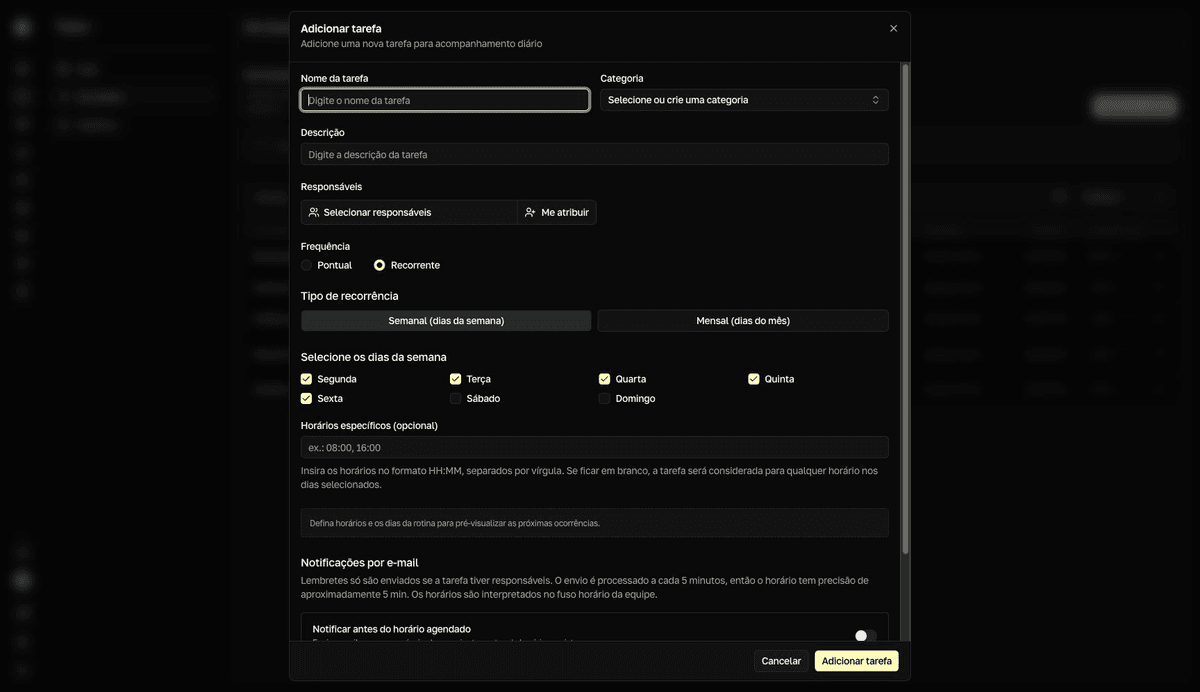
The default is a Monday-to-Friday routine
The form opens with Recorrente (recurring) selected and Monday through Friday checked. If you don't touch the checkboxes, you create a Mon–Fri routine without noticing. Check the Próximas 3 ocorrências (next 3 occurrences) panel before saving.
The same form includes the Notificações por e-mail (email notifications) section, which turns on the task's reminders — see Set up reminders.