Log the day
Every day, open Today and log OK or NOK at each time that came due. These records feed the team's reliability and history.
What the screen shows
Today lists every team task due today — not only yours; the ones assigned to you get the Para você (for you) badge. The list comes in groups: Atrasadas (overdue — one-time tasks that came due on earlier days, with Venceu há X (due X ago) and log buttons right on the row), Pontuais hoje (one-time today), and one group per routine time — Horário livre (no set time) gathers the tasks without a set time. At the top, the status bar counts the day's OK, NOK, and N/A records and the pendentes (pending) times.
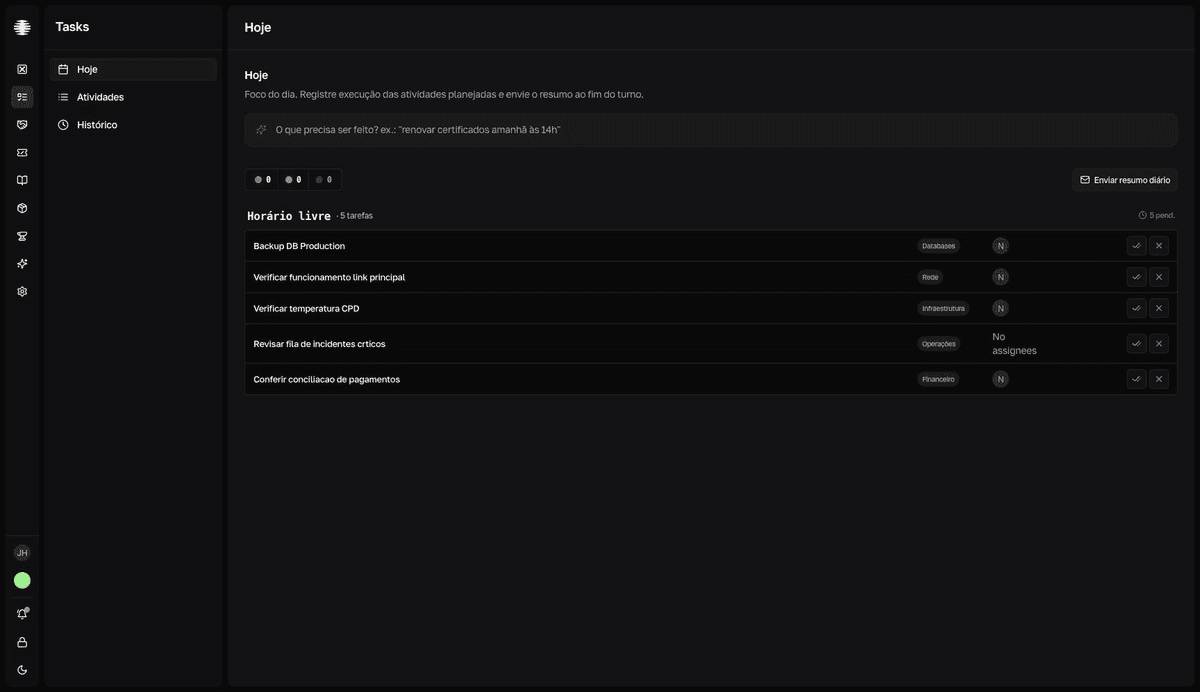
Log each time
- 1
Open `Today` in the Tasks navigation.
- 2
Click `Registrar OK` (log OK) or `Registrar NOK` (log NOK) for the time.
Registrar OKis the green double-check button;Registrar NOKis the red X. UseNOKwhen the task wasn't done or there was a problem. - 3
Fill in the message dialog and confirm.
Every record opens a dialog before saving — currently in English. For
OK, the note is optional (Add Message (Optional)); forNOK, the message is required (Add Failure Message) and theConfirmbutton stays disabled until you describe what went wrong.resultToast "Registro salvo" (Record saved). The row shows the time of the record and the status bar updates.
`NOK` is not a mistake
Logging NOK beats leaving it blank. A NOK with a reason shows what got stuck; a task with no record becomes a blind spot in reliability.
Weekend tasks
Monday through Friday, when the coming Saturday or Sunday has tasks, the collapsed Tarefas do fim de semana (weekend tasks) section appears at the bottom of the page. Expand it to log the weekend times ahead of time — on Friday afternoon, for example. On Saturday and Sunday, those tasks appear in the main list.
Good to know
- The message
Tudo pronto! Todas as atividades de hoje foram registradas.(All set! All of today's activities have been logged.) also appears when the team hasn't created any tasks yet. If you expected to see tasks, check inActivitiesthat they exist — or create the first one. - The
N/Acounter appears in the status bar, but there is no button to markN/Aon the screen — the records you create areOKorNOK. See Statuses and colors. - Logged it wrong? You can change the status and the note while the record is from today — see Fix a record.
- At the end of the shift, send the daily summary to close the day.