Track reliability
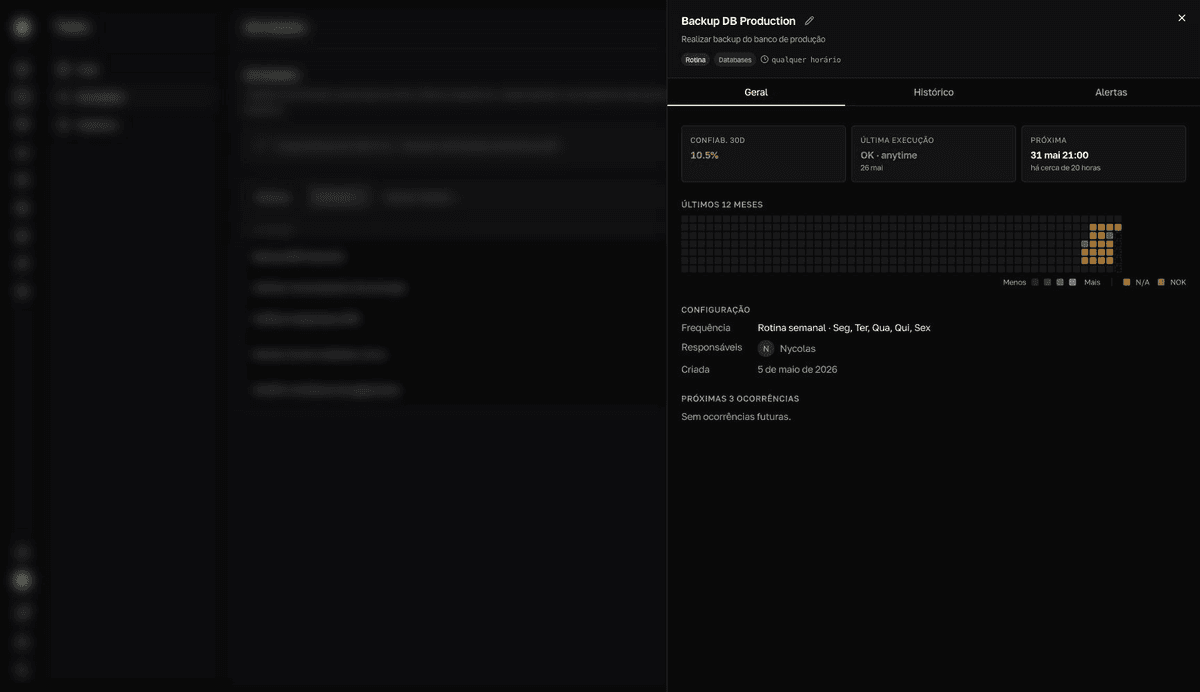
Confiab. 30d (30-day reliability) is the percentage of OK records for a routine over the last 30 days. You read the number in the Activities list and dig deeper in the task's details panel.
From the list to the detail
- 1
Open `Activities` on the `Rotinas` (routines) tab.
The
Confiab. 30dcolumn shows each routine's percentage with a progress bar, colored by the same cutoffs as History:100%,≥80%,≥50%, and<50%. ThePróxima(next) column shows the next occurrence. - 2
Click the routine to open the details panel.
The
Geral(general) tab carries theConfiab. 30d,Última execução(last run), andPróxima(next) indicators, plus thePróximas 3 ocorrências(next 3 occurrences) list. - 3
Read the `Últimos 12 meses` (last 12 months) map.
Each square is a day. Green darkens as more times ended
OK(legendMenos … Mais, less … more); red marks a day withNOK; yellow marks anN/Aday. Hover over a square to see the date and the result.
Days with no record weigh on the number
Days with no record count against reliability as much as a NOK. That's why logging every day, even a NOK, keeps the number true to reality.
One-time tasks have no reliability — they follow the Em breve (upcoming), Pendente (pending), Concluída (completed), and Atrasada (overdue) cycle, shown in the Status column of the Pontuais (one-time) tab. See Statuses and colors.