Enable skills
Enable only the modules Muse should query. The skill unlocks the query for the team; the answer stays limited to what each user can already see.
Turn on the modules
- 1
Open `Settings` in Muse and find `Skills do Muse` (Muse skills).
The
Módulos disponíveis(Available modules) section lists one switch per module. Only Muse administrators see this screen. - 2
Turn on the skills you need.
Each switch describes what it unlocks — see the table below.
- 3
Click `Salvar configurações` (Save settings).
resultThe `Configurações atualizadas` (Settings updated) confirmation appears. The next answers can query the enabled modules.
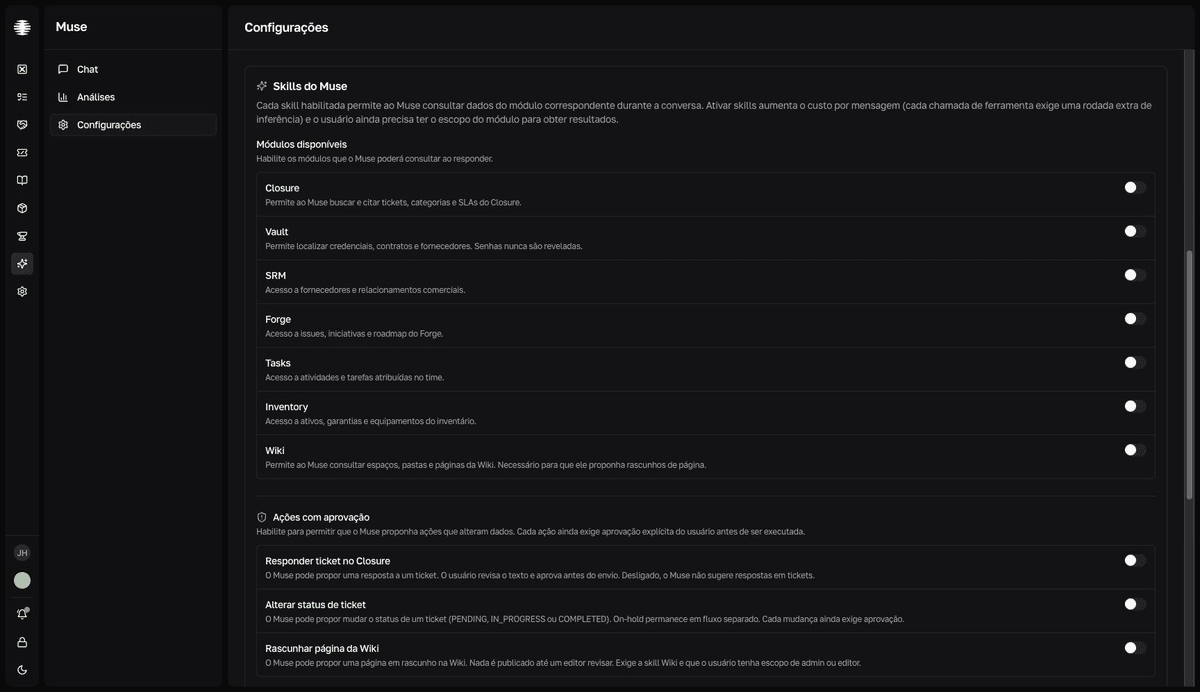
What each skill unlocks
| Skill | Lets Muse |
|---|---|
| Closure | Search and cite tickets, categories, and SLAs. |
| Vault | Locate credentials, contracts, and vendors. Passwords are never revealed. |
| SRM | Query vendors and business relationships. |
| Forge | Query issues, initiatives, and roadmap. |
| Tasks | Query activities and tasks assigned in the team. |
| Inventory | Query inventory assets, warranties, and equipment. |
| Wiki | Query spaces, folders, and pages. Required for Muse to propose page drafts. |
A skill doesn't replace scope
Even with the skill enabled, a user only receives results from modules they already have scope in. Without Closure access, for example, they don't see tickets — even with the skill on.
Cost per message
Enabling skills raises the cost per message: each tool call requires an extra round of inference at the provider. Track the effect in Analytics and adjust the limits if consumption climbs.
Show reasoning
The Mostrar raciocínio (Show reasoning) switch streams the model's reasoning content during the answer — the user sees Pensando… (Thinking…) and, at the end, a summary like Pensou 8s (Thought for 8s). It only works with models that support reasoning (Claude with extended thinking and OpenAI reasoning models). Anthropic bills extended thinking tokens separately — leave it off if cost is sensitive.