Set limits
Set a monthly USD cap for the team and per user. When a limit is reached, new messages are blocked until the month turns over or the limit is raised.
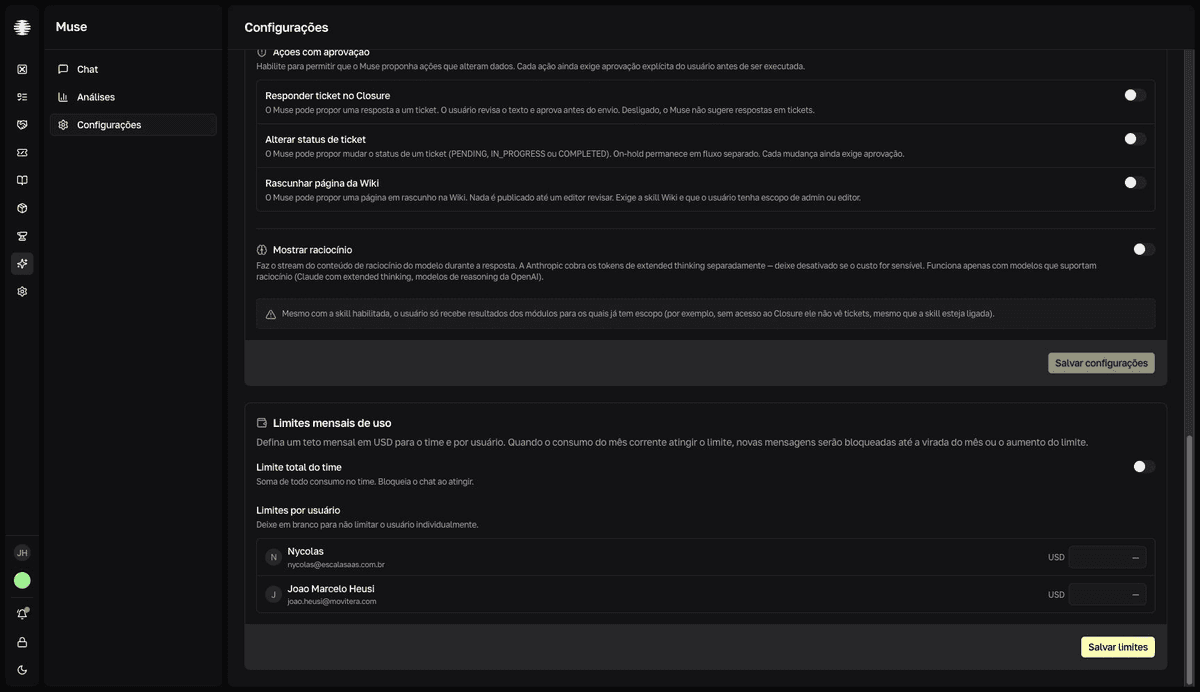
Configure the monthly limits
- 1
Open `Settings` in Muse and find `Limites mensais de uso` (Monthly usage limits).
Only Muse administrators see this screen.
- 2
Turn on `Limite total do time` (Team total limit) and enter the value.
A USD value, such as
50.00(a decimal comma also works). This cap sums every user's consumption and blocks the chat when reached. A switch left on without a value showsInforme um valor para o limite do time ou desative o switch.(Enter a value for the team limit or turn off the switch.); a value that isn't positive showsInforme um valor positivo.(Enter a positive value.) - 3
Set `Limites por usuário` (Per-user limits) when needed.
The list shows only members with Muse access. Leave the field blank to skip limiting that user individually.
- 4
Click `Salvar limites` (Save limits).
resultThe `Limites atualizados` (Limits updated) confirmation appears. The new caps apply to the current month.
What the user sees
In Chat, the Seu uso este mês (Your usage this month) panel shows spend in the Mês (Month), Hoje (Today), and Diário (Daily) columns — the last one a day-by-day chart. The progress bar turns yellow at 80% of the limit and red when it hits 100%; with no cap configured, it shows sem limite (no limit).
When a limit is reached, the message is not sent and the typed text is discarded — the user has to resend it later. The possible warnings:
- "Seu limite mensal foi atingido. Peça a um administrador para aumentá-lo." (Your monthly limit was reached. Ask an administrator to raise it.)
- "Seu limite diário foi atingido. Tente novamente amanhã ou peça a um administrador para aumentá-lo." (Your daily limit was reached. Try again tomorrow or ask an administrator to raise it.)
- "Limite mensal da equipe atingido. Peça a um administrador para aumentá-lo." (The team's monthly limit was reached. Ask an administrator to raise it.)
The daily limit isn't set on this screen
Besides the monthly caps, Muse can apply a daily per-user limit — it appears in the Hoje (Today) column of Seu uso este mês and produces the daily limit warning. This screen configures only the monthly caps; the daily limit resets automatically the next day.