Track due dates in the calendar
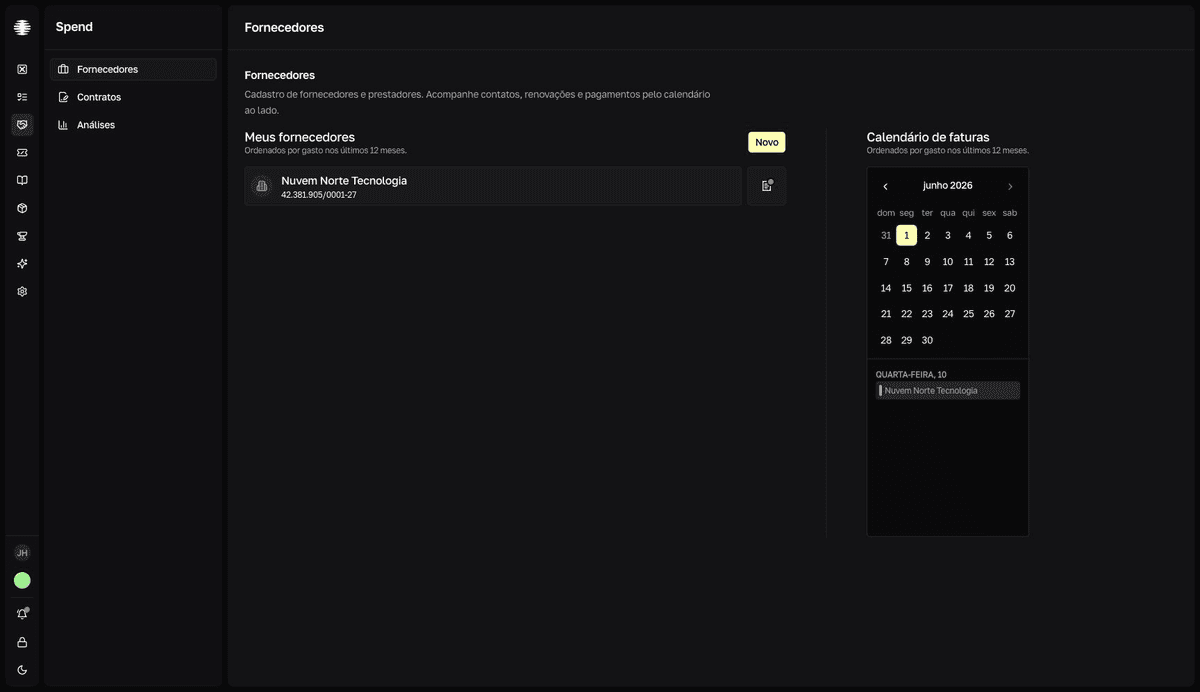
The Calendário de faturas (invoice calendar) shows, month by month, which suppliers already have an invoice recorded and which passed their due day without one.
Put the supplier on the calendar
The calendar sits to the right of the list on the Suppliers screen. It groups suppliers by the day set in Vencimento faturas (invoice due day) — without that field, the supplier does not appear.
- 1
Open the supplier and click the pencil icon next to the name.
The
Editar fornecedor(Edit supplier) dialog opens. - 2
Fill in `Vencimento faturas` with the day of the month and click `Salvar` (Save).
resultThe supplier now appears in the calendar, grouped under that day.
Read the colors
| Color | Meaning |
|---|---|
| Green with a check icon | At least one invoice was recorded for the supplier in the current month. |
| Red with an alert icon | The due day has already passed this month and no invoice was recorded. |
| Gray | The due day has not arrived yet this month. |
Green means an invoice was recorded, not paid
SRM does not track payment status. Green indicates an invoice exists for the supplier this month — record the invoice as soon as it arrives to keep the calendar accurate.
Move between months
Use the calendar arrows to go back to previous months and review the history. You cannot move past the current month. Below the calendar, each group shows the day of the month and the suppliers due on it.