Register suppliers
Register the supplier before recording invoices, contacts, or contracts. Every invoice and every contract belongs to a supplier.
Create a category first
Every supplier needs a Categoria (category). In a new team, the category list starts empty — create the first one before registering the supplier.
- 1
Open `Suppliers` in SRM and click `Novo` (New).
The
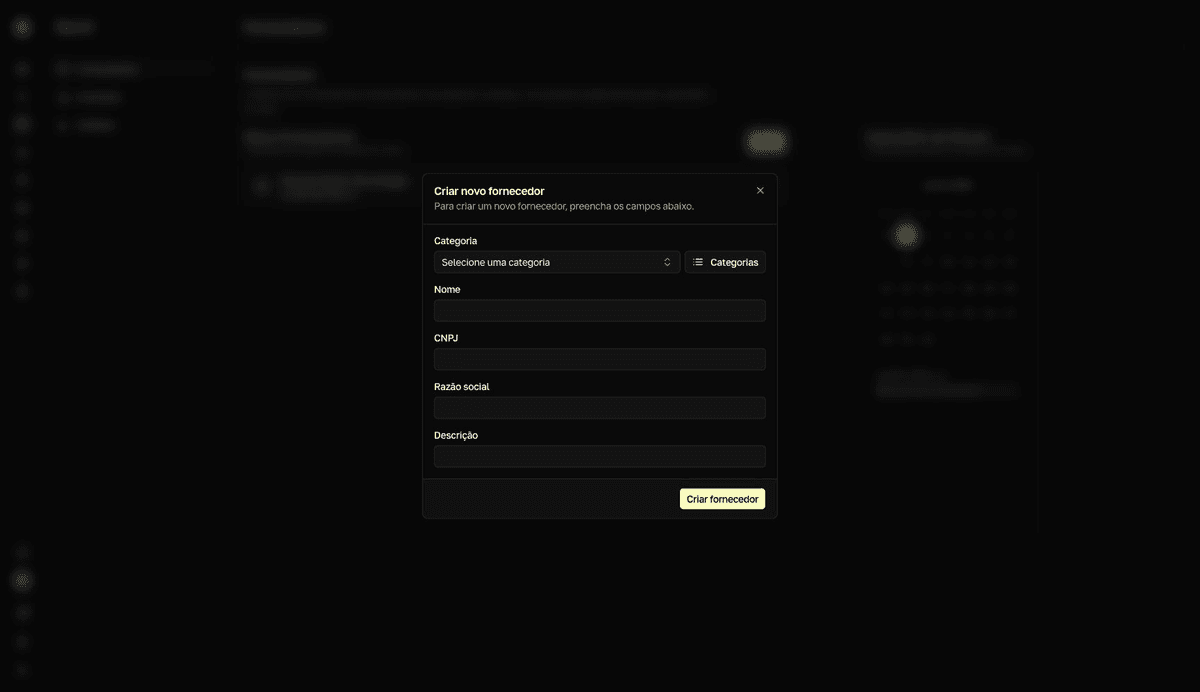
Criar novo fornecedor(Create new supplier) dialog opens with theCategoriafield at the top. - 2
Click `Categorias` (Categories), next to the `Categoria` field.
The
Criar nova categoria de fornecedor(Create new supplier category) dialog opens on top. - 3
Fill in `Nome` (name) and `Descrição` (description) and click `Criar categoria` (Create category).
resultMessage: Categoria criada com sucesso (category created). The category now appears in the Categoria field.
Categories are permanent
There is no way to edit or delete a category after it is created. Pick names the team will keep, such as Software, Telecom, or Services.
Create the supplier
- 1
In the `Criar novo fornecedor` dialog, select the `Categoria`.
- 2
Fill in `Nome` and `CNPJ`.
The CNPJ (Brazilian company tax ID) has 14 digits and is formatted as you type.
Razão social(legal name) andDescriçãoare optional. - 3
Click `Criar fornecedor` (Create supplier).
resultMessage: Fornecedor criado com sucesso (supplier created). The supplier joins the Meus fornecedores list.
Set the invoice due day
The Vencimento faturas (invoice due day) field records which day of the month this supplier's invoices usually fall due. It is what puts the supplier on the invoice calendar.
- 1
Open the supplier in the `Meus fornecedores` (my suppliers) list.
The whole row leads to the supplier page.
- 2
Click the pencil icon next to the supplier name.
The
Editar fornecedor(Edit supplier) dialog opens. - 3
Fill in `Vencimento faturas` with the day of the month and click `Salvar` (Save).
resultMessage: Fornecedor atualizado com sucesso (supplier updated). The supplier now appears in the calendar.
The field only exists when editing
Vencimento faturas does not appear in the creation dialog. Without it, the supplier never enters the Calendário de faturas (invoice calendar).
Add contacts
- 1
On the supplier page, click `Criar` (Create) in the `Contatos` (contacts) section.
The
Criar novo contato(Create new contact) dialog opens. - 2
Fill in `Nome`, `E-mail`, and `Telefone` (phone) and click `Criar contato` (Create contact).
resultMessage: Contato criado com sucesso (contact created). The contact appears in the Contatos section.
To fix a contact, click the pencil on its row, adjust the fields in Editar contato (Edit contact), and click Salvar. Suppliers and contacts cannot be deleted — keep records accurate by editing them.
Find suppliers later
The Meus fornecedores list is sorted by spend over the last 12 months and has no search field. To search, open the command menu and type at least 2 characters — the search matches name, CNPJ, and legal name. The receipt-icon button next to each row records an invoice without opening the supplier page — see Track invoices.