Manage suppliers, contracts, and spend in SRM
SRM centralizes supplier relationships. You register suppliers, record invoices, track contracts, and see team spend without scattered spreadsheets.
The SRM model
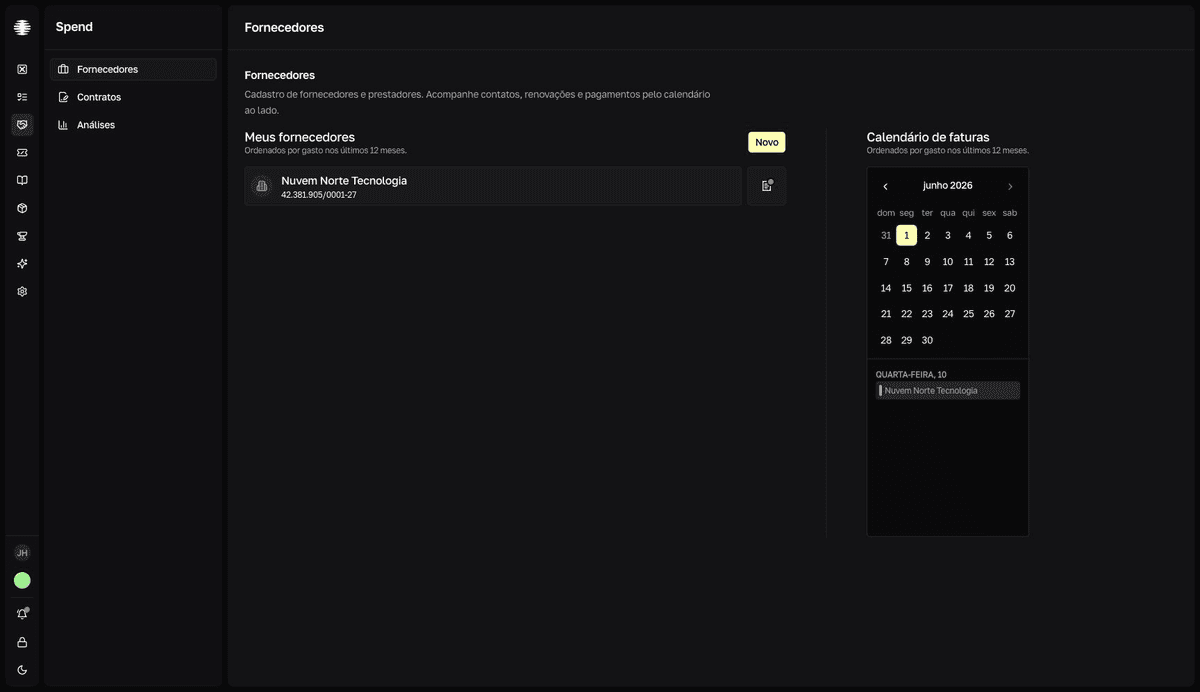
The supplier is the central record. Everything connects to it: a category, contacts, invoices with attachments, and contracts. The Calendário de faturas (invoice calendar) shows who already has an invoice recorded this month, and Analytics adds up invoices to show where the money goes. In the app switcher, SRM appears as Spend.
Main screens
| Screen | Use it for |
|---|---|
Suppliers | Register suppliers and contacts and track due dates in the Calendário de faturas (invoice calendar). |
Contracts | Create contracts and track term, renewals, and value by currency. |
Analytics | Compare supplier spend by period, based on the invoices you record. |
Two badges per contract
Each contract carries two independent badges. The Status (Rascunho, Ativo, Encerrado, Cancelado, Renovado — draft, active, ended, canceled, renewed) is set by you. The Ciclo (lifecycle: Próximo, Vigente, Expira em breve, Expirado — upcoming, active, expiring soon, expired) is calculated from the term dates — Expira em breve covers the next 30 days. See Contract status and lifecycle.
Who sees what
Every member of a team with SRM sees Suppliers and Analytics. The Contracts screen requires the Acesso ao SRM (SRM access) permission — Usuário (user) or Gerenciador (manager) — set per member in Settings → Members. See Control who can access contracts and manage team members.