Work the board
The Issues board is the kanban view of delivery: columns per status, draggable cards, and filters shared by the Board and Lista (List) views.
Move the work forward
- 1
Open `Issues board` in the Forge sidebar.
The columns run from
BacklogtoConcluído(Completed).Arquivado(Archived) is never a column — archived issues stay hidden by default. - 2
Drag the card to the next column.
Dropping the card changes the issue's status immediately.
- 3
Click a card to open the issue panel.
The overlay panel brings description, properties, impediments, and messages. Navigate between issues with
[and]; useAbrir página completa(Open full page) to see attachments and theDesenvolvimento(Development) panel.
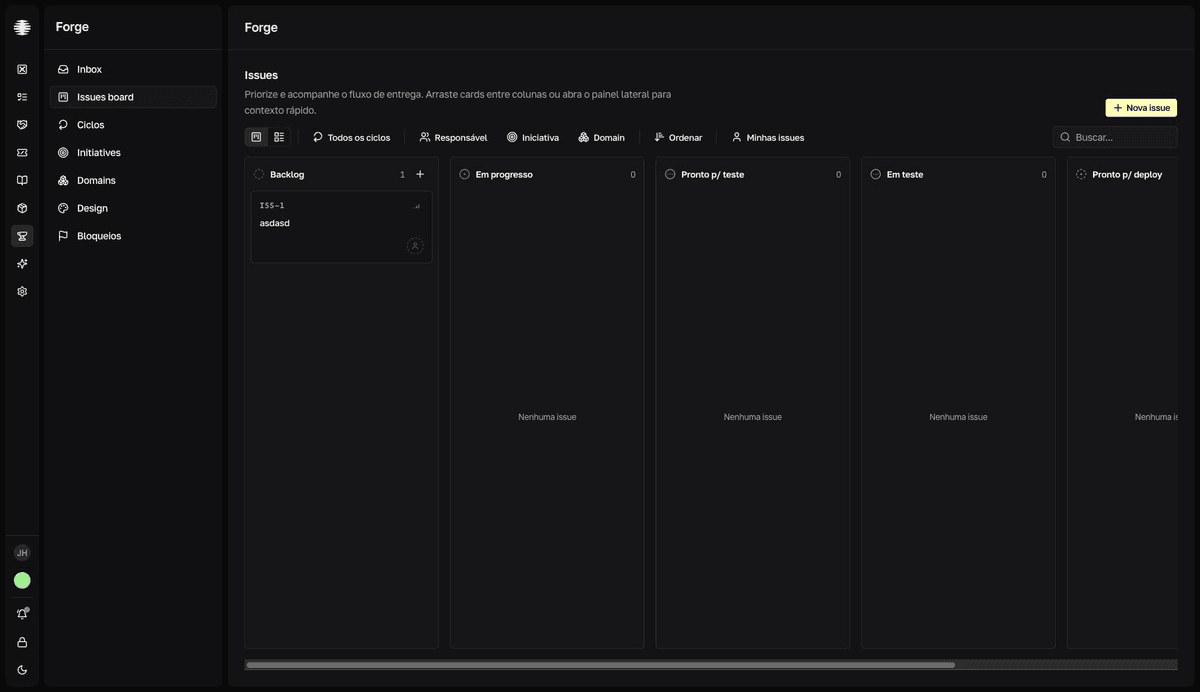
The board shows the active cycle by default
With an active cycle, the Ciclo (Cycle) filter comes already set to it — issues without a cycle, or in other cycles, don't show up. Choose Todos os ciclos (All cycles) or Sem ciclo (No cycle) to see them. Filters are saved in your browser per team and stay applied after you leave and come back.
Filter and sort
| Control | What it does |
|---|---|
Ciclo (Cycle) | Limits the board to one cycle. Includes Todos os ciclos (All cycles) and Sem ciclo (No cycle). |
Status | Available only in the Lista (List) view — on the board, status is the column axis. |
Tipo (Type) | Bug, Funcionalidade (Feature), or Tarefa (Task). |
Responsável (Assignee) | One member, or Sem responsável (No assignee) for ownerless issues. |
Iniciativa (Initiative) | One initiative, or Sem iniciativa (No initiative). The options follow the selected domains. |
Domain | One or more domains. |
Ordenar (Sort) | Title, creation, update, priority, or due date, in either direction. |
Minhas issues (My issues) | Shortcut for assignee = you. |
Buscar... (Search...) | Text search across issues. |
Use the view switcher to alternate between Board and Lista. The Lista view is paginated and is where you find archived issues: filter Status by Arquivado (Archived).