Plan and deliver development in Projects
Projects (formerly Forge) is the Movitera® module where the engineering team plans and delivers work. The unit is the issue, which advances through a status flow on the board, enters time-boxed cycles, and adds up to initiatives organized by domains.
The Projects model
Domains group initiatives by product area or team. Initiatives gather the issues of one large delivery. Issues are the day-to-day units of work, executed in cycles — time-boxed windows, like sprints. Impediments flag what stopped an issue, and designs record the upstream work before implementation.
| Entity | Code | What it is |
|---|---|---|
| Issue | ISS-7 | Unit of work: a bug, a feature, or a task. |
| Initiative | INI-12 | Large delivery that gathers issues, inside a domain. |
| Domain | DOM-3 | Product area or team that groups initiatives. |
| Design | DSG-5 | Upstream design work, linked to issues. |
| Cycle | #4 | Time-boxed window in which issues get done. |
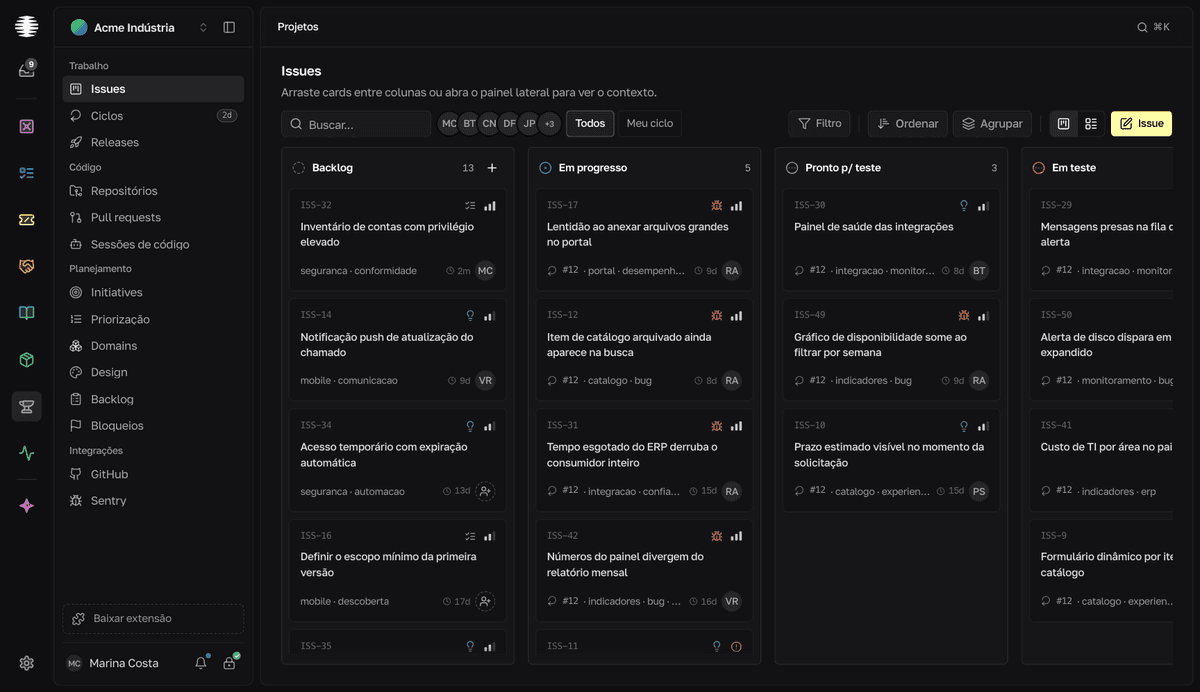
How an issue flows
The issue advances left to right on the board, from Backlog to Done.
Backlog— logged, not started yet.In progress— someone is building it.Ready to testandIn test— under verification.Ready to deploy— approved, waiting for release.Done— delivered.Archived— hidden by default. TheArchivedcolumn only appears on the board when theFilterincludes that status.
Every issue has a type — Bug, Feature, or Task — and a priority from Very low to Urgent, shown as a colored indicator on the card.
Find anything by its code
On any screen in Projects, the command palette creates issues, initiatives, cycles, and designs, navigates between pages, and jumps straight to an entity when you type its code — ISS-42, INI-7, DSG-3. With an issue open, it also moves the status and focuses the message field.
What each role sees
To use Projects, a member needs a Full or Dev seat and a role under Forge access: Administrator, Manager, Project manager, User, or Designer. Everyone sees Issues, Cycles, Releases, Repositories, Pull requests, Initiatives, Prioritization, Domains, Design, and Backlog. Impediments appears for administrators, managers, and project managers. Coding sessions appears for administrators and managers. GitHub and Sentry appear for administrators only. The full reference is in Who sees and does what in Projects, in the links below.