Flag and resolve impediments
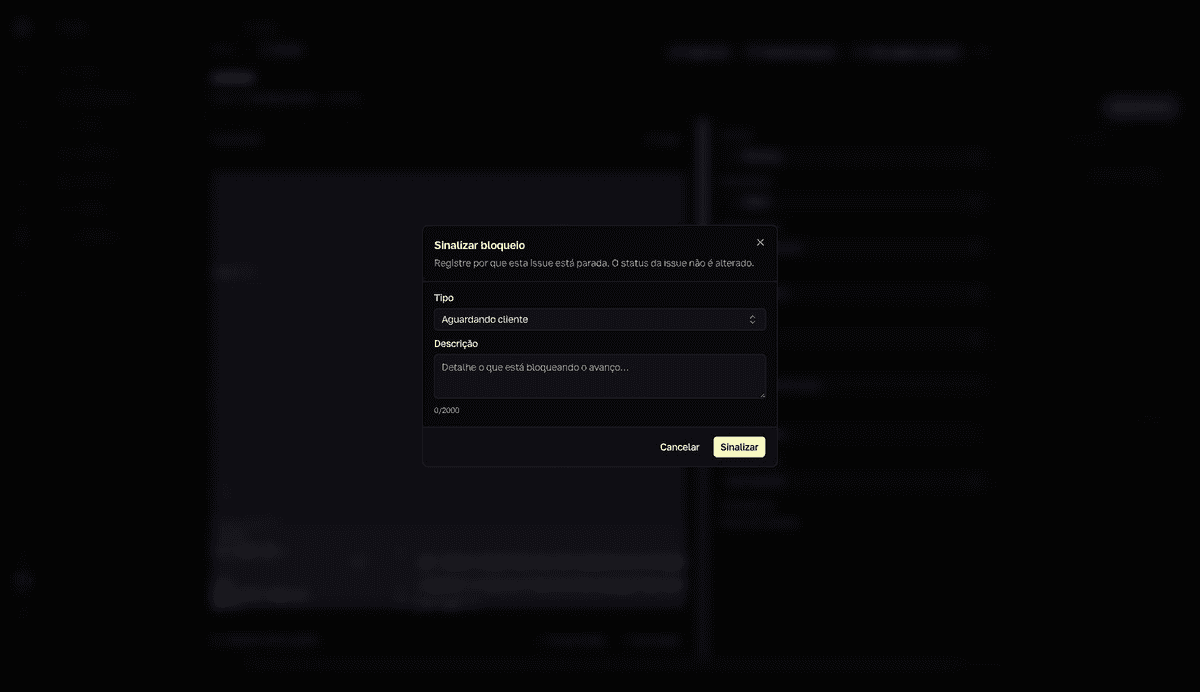
An impediment records why an issue is stuck and keeps that visible to the team. Flagging doesn't change the issue's status — the dialog itself says so: “O status da issue não é alterado.” (The issue's status is not changed.)
Flag the impediment
- 1
Open the stuck issue and click `Sinalizar bloqueio` (Flag impediment).
Managers and admins see the button on any issue; users, only on the issues assigned to them.
- 2
Choose the `Tipo` (Type).
Aguardando cliente(Waiting on customer, the default),Aguardando terceiro(Waiting on a third party),Aguardando decisão(Waiting on a decision),Bloqueado por issue(Blocked by an issue),Bloqueio técnico(Technical blocker), orOutro(Other). ForBloqueado por issue, point to theIssue bloqueante(Blocking issue). - 3
Describe it and click `Sinalizar` (Flag).
Detail what needs to happen to unblock — up to 2000 characters.
resultThe “Bloqueio sinalizado” (Impediment flagged) confirmation appears and the Bloqueios (Impediments) panel shows up on the issue, with the open-impediment counter.
Track and resolve
- In the issue's
Bloqueios(Impediments) panel, clickResolver(Resolve) once it clears. Who can resolve: managers, whoever flagged it, and the issue's assignee. - When the blocking issue completes, the impediment gets the
Pode estar desbloqueado(May be unblocked) badge — review and resolve. - Use
Mostrar resolvidos(Show resolved) to see the issue's impediment history. - Your blocked issues appear in the Inbox's
Bloqueada(Blocked) section — including the ones resolved in the last 24 hours, markedResolvido — pode retomar(Resolved — you can resume).
Resolving doesn't move the issue
Resolving an impediment doesn't change the status on the board. Pick the work back up and move the card yourself.
Managers: the Impediments page
Managers and admins get the Bloqueios (Impediments) page in the Forge sidebar: every impediment on the team, oldest first, with filters by status, type, and assignee, and the Resolver (Resolve) button on each open item. Users don't see this page — they track their own impediments through the Inbox.