Centralize the team's knowledge in the Wiki
The Wiki is the team's knowledge base inside Movitera®. You write pages in an editor with autosave, organize everything into spaces and folders, and control who views and who edits each part.
Spaces, folders, and pages
Wiki content follows a three-level hierarchy. Pages don't sit inside other pages — folders do the nesting.
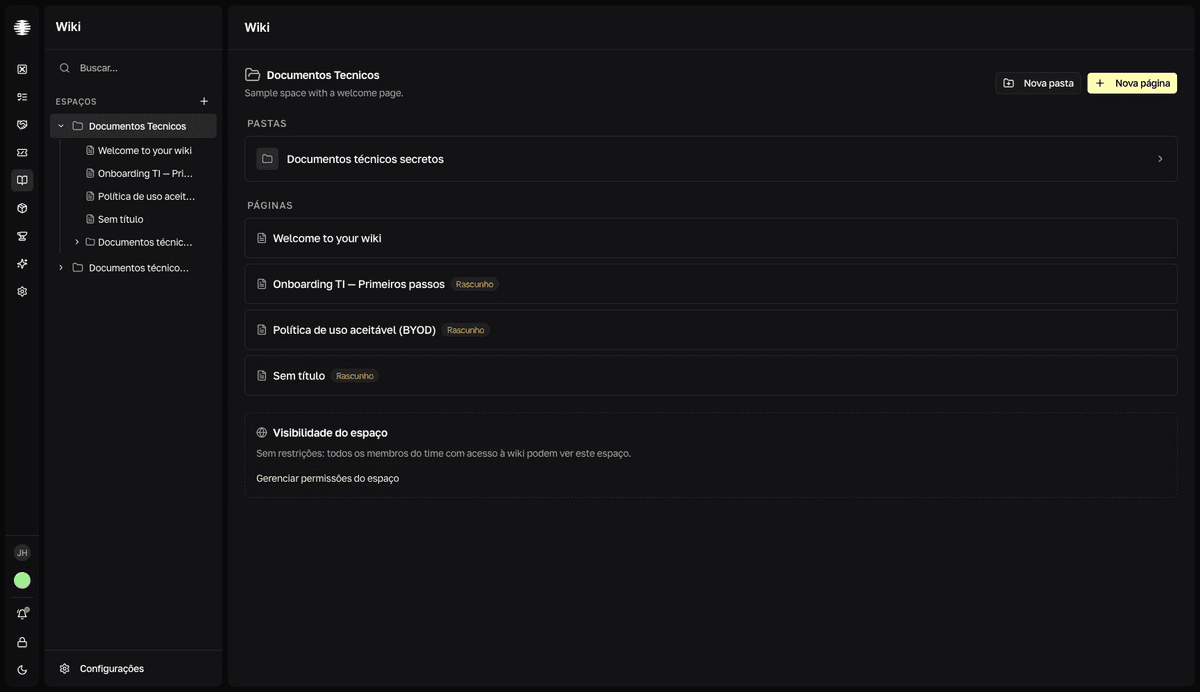
Espaço(Space) — the top-level container. Create one per team, area, or project. Create and manage spaces.Pasta(Folder) — groups pages inside the space and accepts subfolders. Organize pages into folders.Página(Page) — the document itself, written in an editor with formatting, images, and mentions. Write and publish a page.Tag— a marker shared by the whole team, to group pages across spaces. Tag pages.
Draft, published, and archived
Every page has a status, shown as a badge next to the title:
Rascunho(Draft) — being written. Appears in the space listings with an amber badge.Publicado(Published) — the stable version, ready for reference.Arquivado(Archived) — out of use, but still in listings and search with a gray badge. Archive and recover pages.
Status is a signal for the team — it doesn't hide the page. Who sees each page is decided by access, not by status.
Who can do what
Access has two layers. First, each member's Wiki role — Administrador (Administrator), Editor, Visualizador (Viewer), or Sem acesso (No access) — sets what the person can do across the whole module; see Wiki access roles. Then, optional restrictions per space, folder, or page limit who views or edits that content, with the Pode ver (Can view) and Pode editar (Can edit) levels; see Restrict spaces, folders, and pages.
The Wiki appears in the Movitera® menu when the team's plan includes the module — see plans and upgrades.
Where to start
Início (Home) is the Wiki's front door: a Buscar páginas... (Search pages) field and a dashboard of what the team viewed and updated last. Find pages.
Pages circulate through the rest of Movitera®: you mention pages in tickets and issues, and a Closure ticket's screen suggests Wiki pages related to the subject. Mention people, tickets, and pages. New teams get sample pages with the Demo badge — delete them whenever you want.