Handle IT tickets in Closure
Closure is Movitera®'s ticket desk. Requesters open tickets, technicians work them and complete them with a written solution, and the requester approves or rejects the outcome.
What a ticket is
A ticket is a request logged in Closure — a support request, an incident, an IT task. Each ticket gets a code (TKT-42) and carries a title, description, category, status, priority, severity, assigned technicians, followers, due date, attachments, and a chat with the full history of the work.
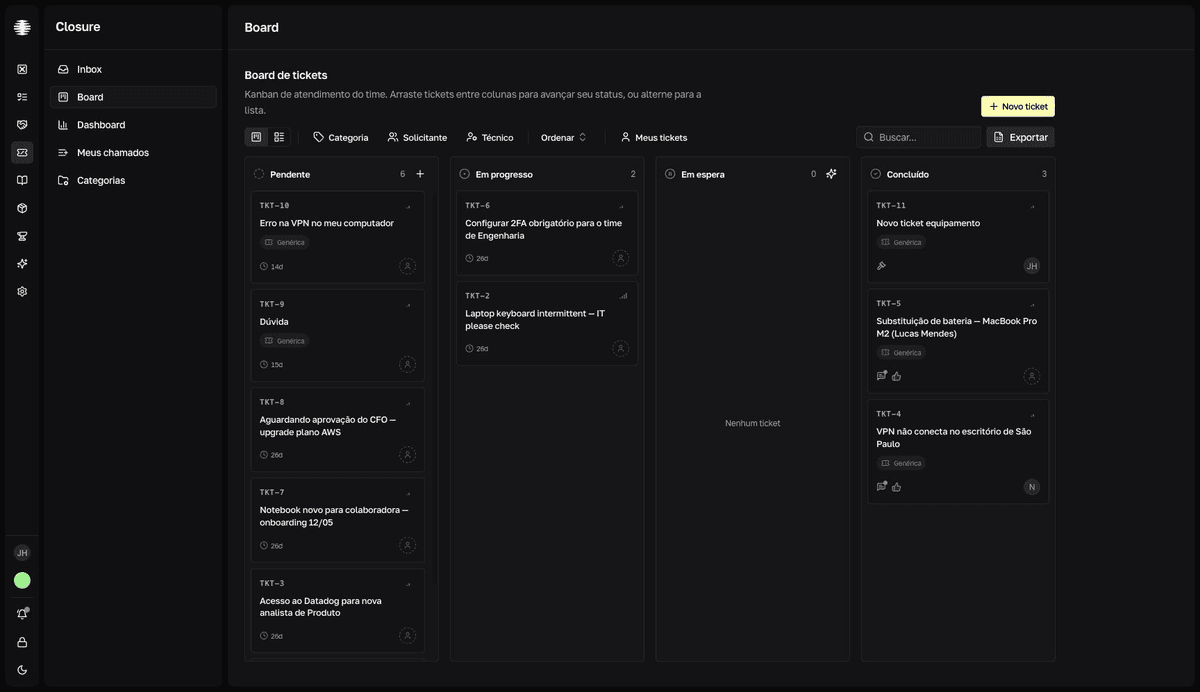
The lifecycle
The ticket moves through four statuses, left to right on the board.
| Status | What it means |
|---|---|
Pendente (Pending) | Ticket open, not picked up yet. |
Em progresso (In progress) | A technician is working on the ticket. |
Em espera (On hold) | Paused waiting on someone: the requester, a third party, an internal owner, or a Forge issue. |
Concluído (Completed) | The technician wrote a solution, which awaits the requester's review. |
Concluído is not the end. The solution enters as Em revisão (Under review) until the person who opened the ticket decides: approve — with a 1-to-5-star rating — or reject with a reason, which sends the work back to the technician.
Who does what
What you see in Closure depends on your role on the team. Requesters track their own tickets in Meus chamados (My tickets); technicians get Inbox, Board, Dashboard, and Categorias (Categories); supervisors can also follow other technicians' Inboxes. The details are in Who sees what in Closure.
Category, severity, and priority
The category defines which additional fields the ticket has and which SLA applies — the SLA deadline is set per severity (Normal, Alta severidade, or Altíssima severidade — normal, high, very high). Priority (Normal, Alta, or Urgente — normal, high, urgent) is a triage field that orders the work; it does not change the SLA. You configure the fields and the SLA in Categories, fields, and SLA.
AI in the workflow
Closure uses AI at points in the flow: Triagem IA (AI triage) suggests severity and category and lists missing information on each ticket; Triagem em espera (on-hold triage) generates a briefing of a technician's on-hold tickets; and the quality check reviews the solution before you send it. See Triage tickets with AI.