Work inside the ticket
The ticket holds everything about the work: the chat with the requester, the internal notes, the triage fields, the due date, the attachments, and the timeline.
Open the ticket with the technician controls
Open the ticket from the Board or the Inbox — or use Abrir página completa (Open full page) for the standalone version with a shareable URL. Tickets opened from Meus chamados (My tickets) show the requester view, without the technician controls, even for technicians.
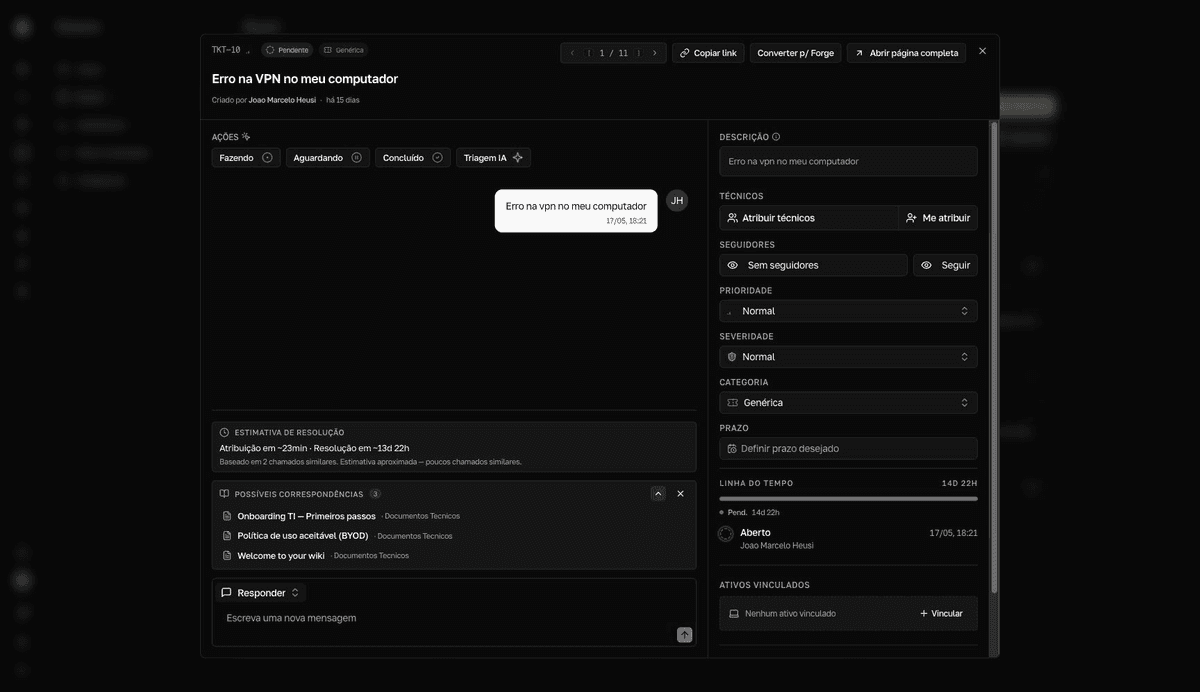
Reply in the chat or log a technical note
The chat is the official history with the requester — the ticket's description appears as the first message. The composer's selector switches between Responder (Reply — a message everyone sees) and Notas (Notes — an internal technical note the requester never sees).
- Mention someone with
@to get their attention — the person becomes a follower of the ticket automatically. - Attach files with the paperclip (
Anexar arquivo— attach file) or paste images straight into the message field.
Edit the ticket's triage
| Field | What it controls |
|---|---|
Técnicos (Technicians) | Who works the ticket. Assign one or more technicians. |
Seguidores (Followers) | Who tracks the updates. Seguir (Follow) and Deixar de seguir (Unfollow) apply to yourself. |
Prioridade (Priority) | Normal, Alta (High), or Urgente (Urgent) — the order of the work. |
Severidade (Severity) | Normal, Alta severidade (High severity), or Altíssima severidade (Very high severity) — the impact. Sets the deadline when the category has SLA enabled. |
Categoria (Category) | The ticket's additional fields and SLA. |
Prazo (Due date) | The target date for the solution (Definir prazo desejado — set desired due date). With a due date, the ticket shows the countdown SLA: 4h restantes (4h remaining) — or Expirado há 2d (expired 2d ago), in red. |
The title is editable too — click it at the top of the ticket. Use Copiar link (Copy link) to share the ticket with the team.
Attachments and timeline
Anexos(Attachments) accepts documents, spreadsheets, PDFs, and images.Adicionar anexo(Add attachment) uploads new files andBaixar ZIP(Download ZIP) downloads everything at once.- Images open in a carousel with the author, the date, and, when available, an AI-generated description.
Linha do tempo(Timeline) shows the total duration and every event on the ticket: opening, status changes, assignments, holds, and the solution's back-and-forth.