Track the support metrics
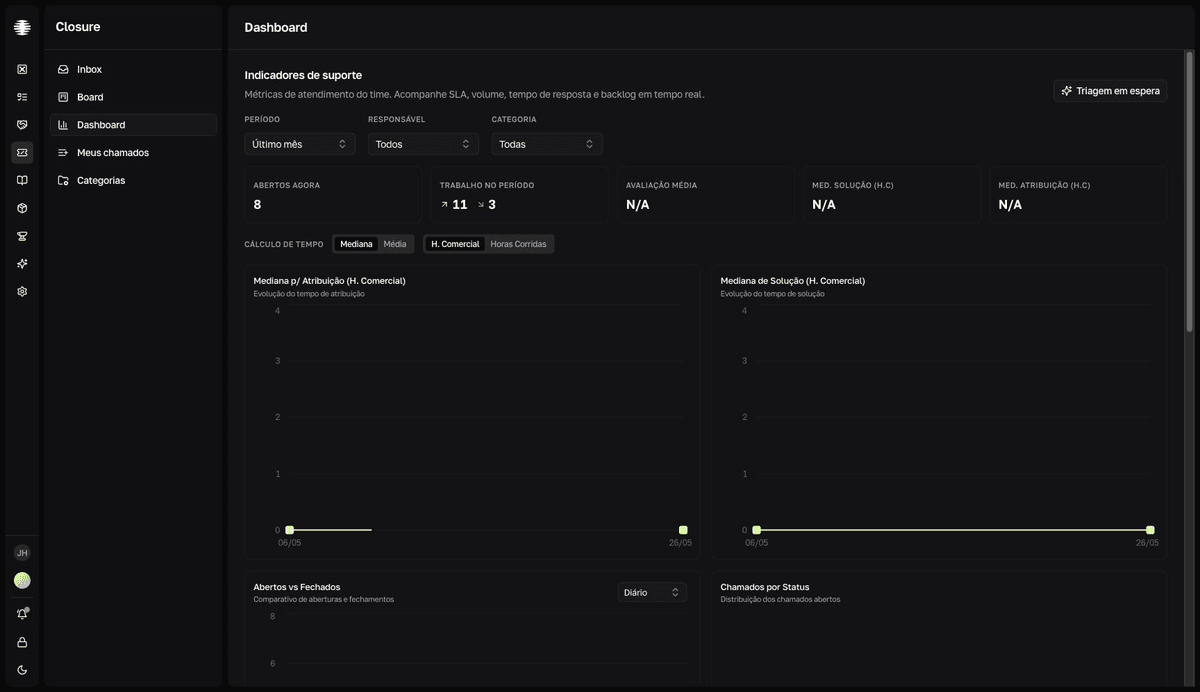
The Indicadores de suporte (Support metrics) page shows how the team is doing: volume, backlog, assignment and solution times, and the requesters' ratings.
Adjust the scope
- 1
Open `Dashboard` in the Closure sidebar.
The cards and charts load with the last month by default.
- 2
Filter by `Período` (Period), `Responsável` (Assignee), and `Categoria` (Category).
PeríodooffersÚltima semana(Last week),Último mês(Last month),Último trimestre(Last quarter), andPersonalizado(Custom) — the last one opens theIntervalo(Range) calendar. - 3
Choose the `Cálculo de tempo` (Time calculation).
Switch between
Mediana(Median) andMédia(Average) and betweenH. Comercial(business hours) andHoras Corridas(wall-clock hours). Every time metric follows the choice: the median suffers less from outlier tickets, and business hours ignore nights and weekends.
The cards
| Card | What it shows |
|---|---|
Abertos agora (Open now) | How many tickets are open right now. |
Trabalho no Período (Work in the period) | Openings and closings in the period and the impact on the backlog. |
Avaliação Média (Average rating) | The average rating (1 to 5 stars) given by requesters and the total number of ratings. |
| Solution time | The time between opening and solution, in the chosen calculation. |
| Assignment time | The time between opening and the first technician assignment. |
The time cards' titles follow the chosen calculation — Med. Solução (H.C), for example, is the median solution time in business hours.
The charts
| Chart | What it answers |
|---|---|
Abertos vs Fechados (Opened vs closed) | Is the team closing at the pace it opens? Daily, weekly, or monthly granularity. |
Chamados por Status (Tickets by status) | How the open tickets are distributed across the statuses. |
Chamados por Categoria (Tickets by category) | Which categories concentrate the open volume. |
| Assignment and solution over time | How assignment and solution times varied over the period. |
Percentis de Resolução (Resolution percentiles) | P90, P95, and P99 of the resolution time — the size of the slow-case tail. |
Tempo até Conclusão (Time to completion) | The distribution of closings by time bucket, from under an hour to over a month. |
Backlog ao Longo do Tempo (Backlog over time) | How the pending tickets evolved over the period. |
Cumprimento de SLA (SLA attainment) | What percentage of tickets with a deadline were resolved within SLA. Shows the overall attainment rate and a breakdown by severity, type, and category. |
Supervisors: on-hold tickets briefing
Supervisors see the Triagem em espera (On-hold triage) button at the top of the Dashboard: pick a technician under Selecione um técnico (Select a technician) and click Gerar briefing (Generate briefing) for the AI to summarize their on-hold tickets.