Work the Inbox
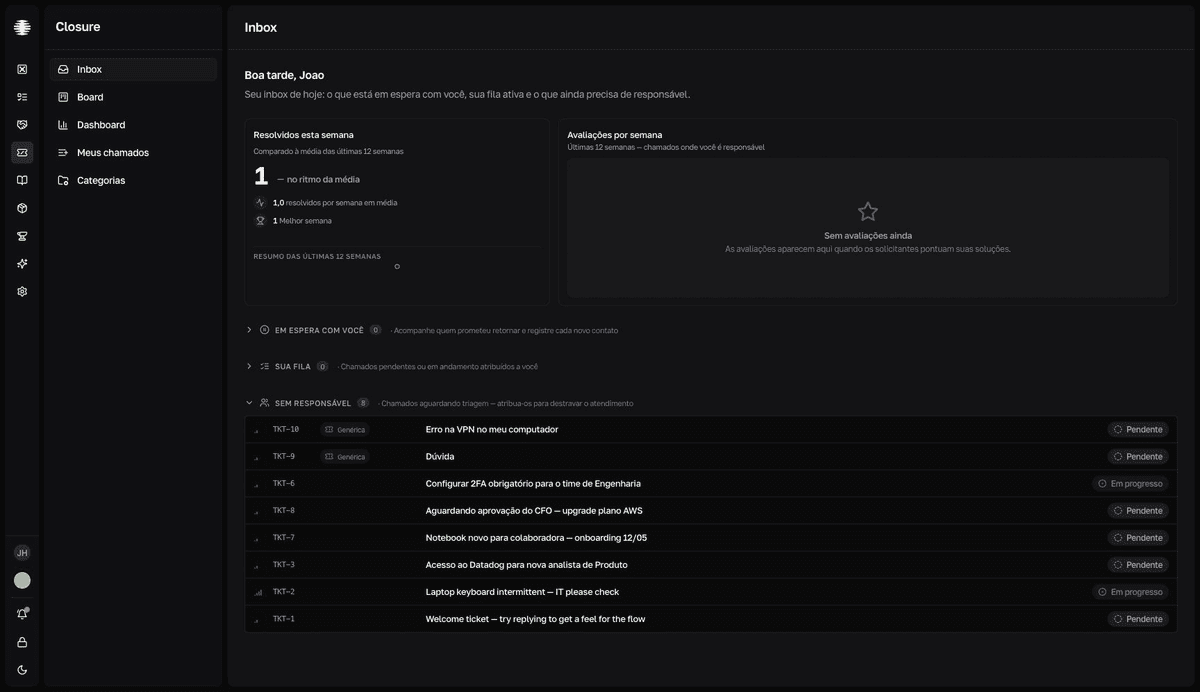
The Inbox is the technician's home page: your indicators for the week and three queues — what's on hold with you, your active queue, and what still needs an assignee.
The three queues
| Queue | What it gathers |
|---|---|
Em espera com você (On hold with you) | Your Em espera (On hold) tickets, ordered from oldest contact to newest — whichever has gone longest without a follow-up appears first. |
Sua fila (Your queue) | Your Pendente (Pending) and Em progresso (In progress) tickets. |
Sem responsável (No assignee) | The team's open tickets with no technician assigned, waiting for triage. |
Start the day in the Inbox
- 1
Open `Inbox` in the Closure sidebar.
The
Resolvidos esta semana(Resolved this week) andAvaliações por semana(Ratings per week) cards show your closing pace and the requesters' average rating over the last 12 weeks. - 2
Distribute what's under `Sem responsável`.
Open each ticket and assign a technician in the
Técnicos(Technicians) field — or useAtribuir a mim(Assign to me) in the quick search (Cmd+K). A ticket with no assignee is work at a standstill. - 3
Log contacts under `Em espera com você`.
Each row has a
Registrar follow-up(Log follow-up) button. Note the contact you made and send it with⌘↵.resultToast "Follow-up registrado" (Follow-up logged). The ticket moves down the queue, and the row shows the total follow-ups and how long ago the last one was. - 4
Advance `Sua fila`.
Open each ticket and work on it. The panel opens on top of the Inbox, and the
[and]keys take you to the previous and next ticket without closing the panel.
Supervisors: follow another technician
Supervisors get the Selecione um técnico (Select a technician) picker at the top of the Inbox to see any technician's queues and indicators — and act on their behalf. Mind the page's notice: "As ações que você executar serão registradas em seu nome." (Actions you take are recorded under your name.)