Know what the team has, where it is, and what state it's in
Inventory tracks two connected worlds: the assets you register — laptops, monitors, peripherals — and the real devices the Movitera Link agent reports. Linked together, they show what the team has, who has it, and what state it's in.
Assets and devices: the module's model
An asset is the inventory record of a physical asset: it has an Etiqueta (asset tag — for example, MOV-2026-00001), a category, a status, a condition, a location, and an auditable history. The product lists assets as "Itens" (items), and some dialogs and messages call them "ativo" (asset) — it's the same record. A device is a real computer that runs the Movitera Link agent and reports hardware, network, security, and software. You can link a device to an asset (always 1:1) to close the loop between the record and the machine.
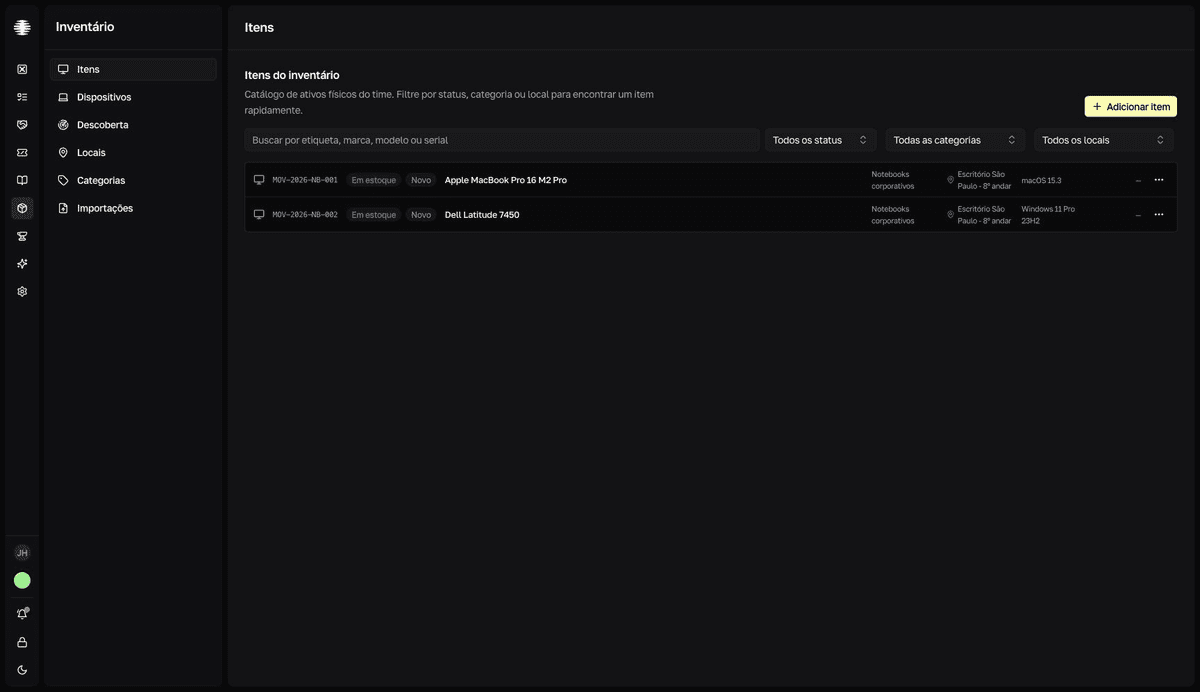
Status and condition
| Field | Values |
|---|---|
| Status | Em uso (In use), Em estoque (In stock), Em reparo (In repair), Desativado (Decommissioned), Perdido (Lost), Roubado (Stolen). |
| Condition | Novo (New), Bom (Good), Regular (Fair), Ruim (Poor), Danificado (Damaged). |
Three similar verbs, three different things
| Action | What it does |
|---|---|
Atribuir (Assign — asset) | Hands the asset to a Usuário (User), a Departamento (Department), or Estoque (Stock), with the return recorded. See Assign, return, and track. |
Vincular (Link — device) | Ties a Movitera Link device to an asset, 1:1. See Link a device to an asset. |
Atribuir colaborador (Assign teammate — device) | Sets who answers for a device. See Track the team's devices. |
What else the module covers
- Software licenses — their own records, separate from assets, with seats you can assign to assets and people, plus compliance reports.
- Software risk — findings about the apps your devices report: end of life, vulnerabilities, unsanctioned remote access.
- Network discovery — networks and devices the agents see that aren't part of the inventory yet.
- Maintenance, warranties, and disposal with a sanitization trail — each asset's life cycle.
- Remote control — view or control a device's screen, with consent.
What you see in the module depends on your access: management pages and actions appear only for members with Gerenciador (Manager) access. See Who can do what in Inventory.
Sample data
Assets and categories created when the team was activated show a Demo badge. They're sample data, safe to delete: click the badge and use Limpar demo (Clear demo).