Log maintenance
Record what was done to an asset — a repair, an upgrade, an inspection — to build the maintenance history in the asset's own Maintenance tab.
Log the maintenance
- 1
Open the asset in `Items` and click `Registrar manutenção` (Log maintenance).
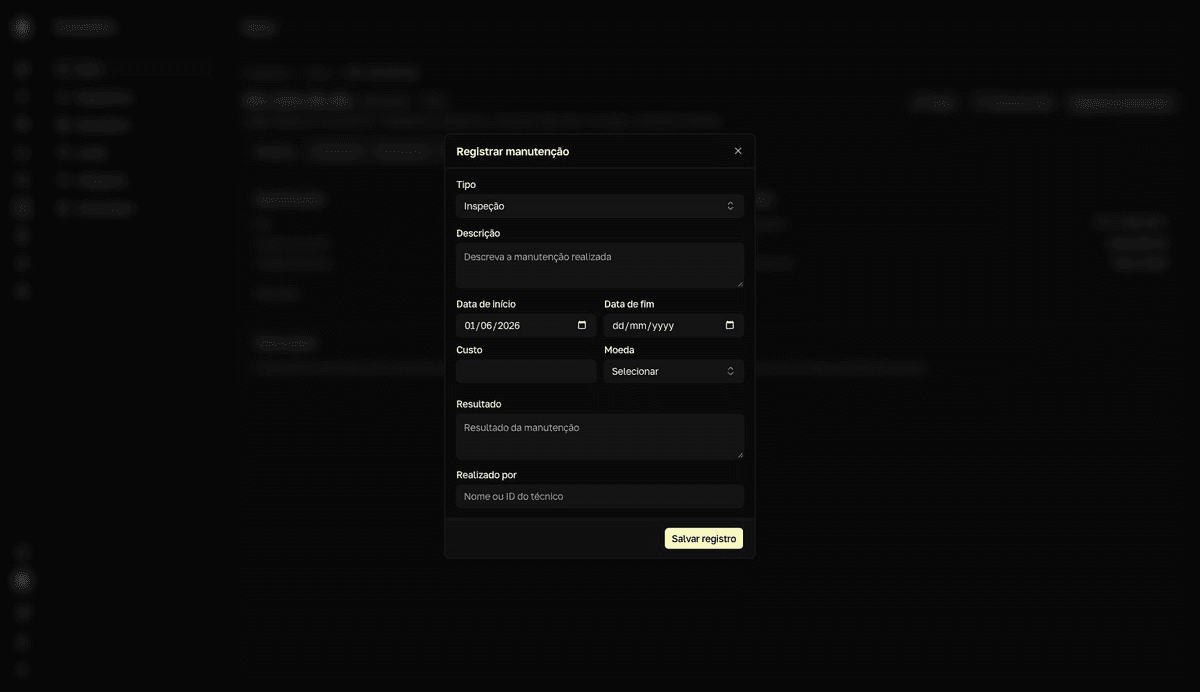
The "Registrar manutenção" (Log maintenance) dialog opens. The button is also in the asset's
Manutenção(Maintenance) tab. - 2
Choose the type.
Reparo(Repair),Upgrade,Inspeção(Inspection),Limpeza(Cleaning), orOutro(Other). The default isInspeção. - 3
Fill in the `Descrição` (Description) and the `Data de início` (Start date).
They're the two required fields — without them the form answers "A descrição é obrigatória" (description is required) and "A data de início é obrigatória" (start date is required). If you want, also record the end date, the cost, the currency, the outcome, and who performed it.
- 4
Click `Salvar registro` (Save record).
resultToast "Registro de manutenção criado com sucesso" (Maintenance record created successfully). The record appears in the Maintenance tab, with type, description, dates, outcome, and cost.
While the equipment is in for repair, use Editar (Edit) on the asset and change the status to Em reparo (In repair) — so the Items list reflects the real situation. The status change and the maintenance record both enter the asset's History.